Quickly move to the end or beginning of big chunks of data.
Magic shortcut is Ctrl + <arrow_key>Ctrl + Up - Moves cursor up until empty cell
Ctrl + Down - Moves cursor down until empty cell
Ctrl + Left - Moves cursor left until empty cell
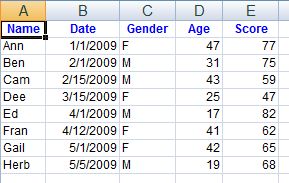
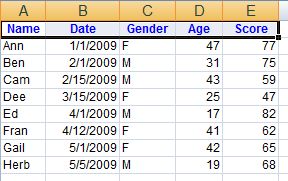
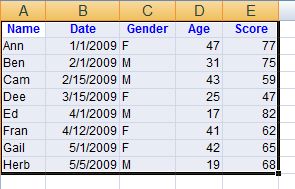
Ctrl + Right - Moves cursor right until empty cell When holding Ctrl + Shift + <array keys> it moves cursor and extends the selection area. Very practical example to select rectangular data within TWO strokes:
- While holding "Ctrl + Shift" push "Left"
- While still holding "Ctrl + Shift" push "Down"
# Date data end within VBA code
The same keyboard trick is available from VBA code
Sheets("Sheet1").Cells(1, 1).End(xlToRight)
Sheets("Sheet1").Cells(1, 1).End(xlDown)
Sheets("Sheet1").Cells(1, 1).End(xlToLeft)
Sheets("Sheet1").Cells(1, 1).End(xlUp)