CodeIgniter is great framework by its simplicity. But when I moved from CakePHP, I really missed layout pattern.
CodeIgniter documentations offers this way to include non-changing site header and footer
$this->load->view('header');
$this->load->view('template');
$this->load->view('footer');
For sure it isn't flexible and does not show page structure in a clear way. For many years I use layout pattern. Layout describes whole page as a template with blocks for header, menu, content, etc like on figure below. On page rendering these blocks are filled with data.
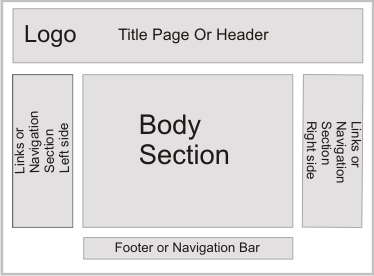
Lets start from simple usage example
# Simple usage of Layout
Download and put Layout.php into application/libraries folder.
Create new default layout in views/layout/default.php with content:
<html>
<head>
  <title><?=$title_for_layout?></title>
</head>
<body>
  <?=$content_for_layout?>
</body>
</html>
- Create controller
class Main extends CI_Controller {
    // Layout used in this controller
    public $layout_view = 'layout/default';

    public function index() {
       $this->load->library('layout');          // Load layout library
       $this->layout->title('Site index page'); // Set page title
       $data = array();
       $this->layout->view('index', $data);     // Render view and layout
    }
}
Simple. All data passed to the template in $data is also passed to the layout template.
# Handling JS & CSS
This is first area of improvement.
I added code to include most used external resources like Javascript and CSS files. This way its possible to make optimizations later like stripping/minimizing content or combining into one file.
class Main extends CI_Controller {
   public $layout_view = 'layout/default';

   public function index() {
      // Page local resource
      $this->layout->js('js/index.js');
      $this->layout->css('css/index.css');
      $this->layout->title('Page title');
      $this->layout->view('index');
   }
}
Use this for layout/default.php to include resources. It contains two variable $css_for_layout and $js_for_layout
<html>
<head>
   <title><?=$title_for_layout?></title>
   <?=$css_for_layout?>
   <?=$js_for_layout?>
</head>
<body>
  <?=$content_for_layout?>
</body>
</html>
# Globalizing
CI offers a way to create a parent class for all controllers in the project. Its a very good place to put site global code.
For example it is not convinient to specify default template in each controller file since sites usually have only one template. Same is related to resources like JS and CSS, some of them are global and must be included in each sit epage.
Lets create file in application/core/MY_Controller.php with content
class <strong>MY_Controller</strong> extends CI_Controller  {
   // Site global layout
   public $layout_view = 'layout/default';

   function __construct() {
      parent::__construct();
      // Layout library loaded site wide
      $this->load->library('layout');

      // Site global resources
      $this->layout->js('js/jquery.min.js');
      $this->layout->css('css/site.css');
   }
}
Next is the controller class itself
class Main extends MY_Controller {
   // Layout is not specified here, it is inherited from MY_Controller

   function __construct() {
      parent::__construct();
      // Local resource used for all pages served by this controller
      $this->layout->js('js/jlib.min.js');
      $this->layout->css('css/product.css');
   }

   public function index() {
      // Page specific resource
      $this->layout->js('js/lib2.js');
      $this->layout->css('css/page.css');

      $this->layout->title('Page title');
      $this->layout->view('index');
   }

   // This page uses different layout
   public function page2() {
      $this->layout_view = 'layout/short.php';
      $this->layout->title('Page title');
      $this->layout->view('index');
   }
}
# Template inheritace like in Twig in CodeIgniter
Next area of improvement.
Twig is a popular template engine available for PHP and it has a very nice feature called template inheritance. I personally do not see any practical usage of any template engines except PHP itself, but I love this feature and incorporated it here.
Where to use it? Example: You want to implement breadcrumbs and they depends on what is current page.
In your layout make a space for it anywhere with block function
<html>
<head>
 <title><?=$title_for_layout?></title>
 <?=$css_for_layout?>
 <?=$js_for_layout?>
</head>
<body>
  <?$this->layout->block('breadcrumbs')?>
  Site |
  <?$this->layout->block()?>
  <?=$content_for_layout?>
</body>
</html>
In page template include block with same name and it would be replaced in layout with content generated in template
<?$this->layout->block('breadcrumbs')?>
Breadcrumbs for this page
<?$this->layout->block()?>
Page content!
# Full source code
<?php
/**
 * CodeIgnighter layout support library
 *  with Twig like inheritance blocks
 *
 * v 1.0
 *
 *
 * @author Constantin Bosneaga
 * @email  [email protected]
 * @url    http://a32.me/
 */

if (!defined('BASEPATH')) exit('No direct script access allowed');

class Layout {
    private $obj;
    private $layout_view;
    private $title = '';
    private $css_list = array(), $js_list = array();
    private $block_list, $block_new, $block_replace = false;

    function Layout() {
        $this->obj =& get_instance();
        $this->layout_view = "layout/default.php";
        // Grab layout from called controller
        if (isset($this->obj->layout_view)) $this->layout_view = $this->obj->layout_view;
    }

    function view($view, $data = null, $return = false) {
        // Render template
        $data['content_for_layout'] = $this->obj->load->view($view, $data, true);
        $data['title_for_layout'] = $this->title;

        // Render resources
        $data['js_for_layout'] = '';
        foreach ($this->js_list as $v)
            $data['js_for_layout'] .= sprintf('<script type="text/javascript" src="%s"></script>', $v);

        $data['css_for_layout'] = '';
        foreach ($this->css_list as $v)
            $data['css_for_layout'] .= sprintf('<link rel="stylesheet" type="text/css"  href="%s" />', $v);

        // Render template
        $this->block_replace = true;
        $output = $this->obj->load->view($this->layout_view, $data, $return);

        return $output;
    }

    /**
     * Set page title
     *
     * @param $title
     */
    function title($title) {
        $this->title = $title;
    }

    /**
     * Adds Javascript resource to current page
     * @param $item
     */
    function js($item) {
        $this->js_list[] = $item;
    }

    /**
     * Adds CSS resource to current page
     * @param $item
     */
    function css($item) {
        $this->css_list[] = $item;
    }

    /**
     * Twig like template inheritance
     *
     * @param string $name
     */
    function block($name = '') {
        if ($name != '') {
            $this->block_new = $name;
            ob_start();
        } else {
            if ($this->block_replace) {
                // If block was overriden in template, replace it in layout
                if (!empty($this->block_list[$this->block_new])) {
                    ob_end_clean();
                    echo $this->block_list[$this->block_new];
                }
            } else {
                $this->block_list[$this->block_new] = ob_get_clean();
            }
        }
    }

}
Download Layout.php
Comments are very welcome!